Remembers images and screenshots with a thumbnail, not just text - hit Return to paste them back. Text can also paste as trimmed, lowercase, UPPERCASE, slug, or pretty-printed JSON.
Smart Actions
Links get Open, emails get Compose, hex colors show a live swatch with Copy-as-RGB. Content-aware, not just storage.
Sensitive Auto-Expire
Card numbers, one-time codes, and tokens are detected and quietly removed after a few minutes. Privacy on autopilot.
Instant Undo
Deleted or cleared something by accident? ⌘Z brings it right back. Up to ten levels of history.
Quick Look Preview
Press Space to expand any clip's full text before you paste it. No more guessing which one.
Favorites & Time Groups
Star clips to pin them to the top. Everything else is grouped into Today, Yesterday, and Earlier.
Keyboard First
Open with ⌥H, filter as you type, arrow to select, ⌘1-9 to paste instantly. Your hands never leave the keys.
Private by Default
100% local. No cloud, no account, no telemetry. Password-manager copies are ignored automatically.
New in v0.1.5
Drag Shelf. A pocket for your drags.
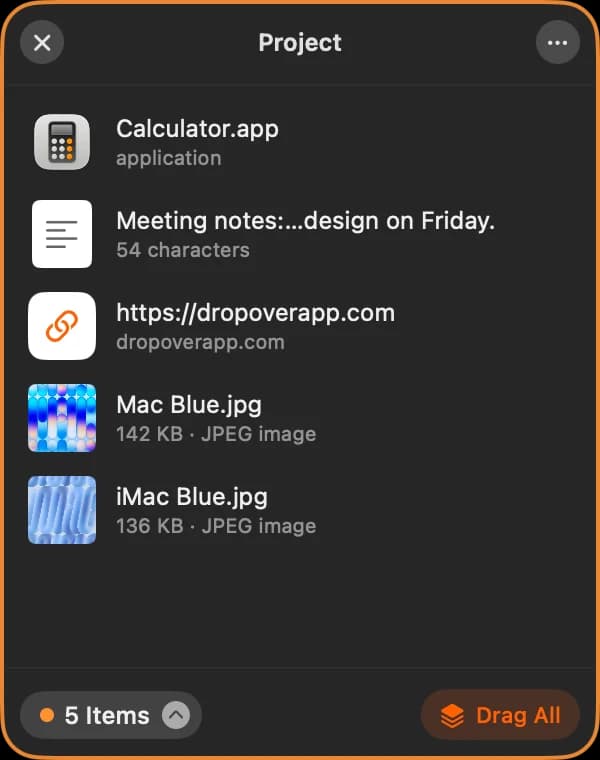
Moving files between windows shouldn't take three hands. Shake the pointer mid-drag and Historr gives you a floating shelf to drop things on. Or press ⌥⇧D anytime.
Demo video coming soon
01
Shake while dragging
Start dragging files, photos, links or text, then give the pointer a quick shake. A shelf appears right under it.
02
Drop and keep going
Let go to drop. Collect more from other folders, apps and windows. Everything waits in one neat pile.
03
Drag it all out
Grab the pile and drop everything into Finder, Mail, Slack or any app in a single move. The originals stay put.
Historr is a free clipboard history manager for macOS. Unlike most clipboard tools that only store what you copied, Historr also acts on it - with a sequential Paste Stack, paste transforms, smart actions, and auto-expiring secrets - while staying 100% local and private.
Feature
Historr
Maccy
Paste
Price
Free
Free
Subscription
100% local / no account
✔
✔
-
Sequential Paste Stack
✔
-
-
Paste transforms
✔
-
Partial
Smart actions (links/colors)
✔
-
-
Auto-expiring secrets
✔
-
-
Drag & drop shelf
✔
-
-
Keyboard-first
✔
✔
✔
Comparison reflects core capabilities at the time of writing. Maccy and Paste are trademarks of their respective owners.
⌥H
Your hands never leave the keys.
Every action has a shortcut. Open, filter, select, paste - without touching the mouse.
⌥H
Open clipboard history
⌥⌘V
Paste next item in stack
↑↓
Move selection
⏎
Paste selected
⌘1-9
Paste the Nth item
Space
Quick Look preview
⌘Z
Undo a delete or clear
Esc
Dismiss the popup
From people who use it
Small app. Big difference.
4.8
★★★★★★★★★★4 reviews from Historr users
★★★★★★★★★★
The Dropover-style shelf makes moving files between apps so convenient. I can gather what I need in one place, then drop everything where it belongs.
Shehan★★★★★★★★★★
Simple, useful, and private. I appreciate that my clipboard stays on my Mac, with keyboard shortcuts that keep everything within reach.
Samuel★★★★★★★★★★
Paste Stack is my favorite feature. Queuing several items and pasting them in order makes repetitive form filling much easier.
Oliver Jr.
You can also review from the app: choose Write a Review… from the Historr menu bar icon.
Get Historr. It's free.
One download, no account, no subscription. Works on Apple Silicon and Intel.
3Grant Accessibility once so it can paste into other apps.
4Press ⌥H anytime to open your history.
Questions, answered.
Historr is a strong free clipboard manager for Mac if you want local-only clipboard history, keyboard-first search, a sequential Paste Stack, paste transforms, and no subscription.
Yes. Historr is designed to be safe and private: clipboard history stays on your Mac, password-manager copies are ignored, and sensitive-looking items can auto-expire.
No. Historr does not upload your clipboard history. The app has no cloud sync, no account, and no telemetry.
A Paste Stack is a queue of copied items that you can paste one-by-one in order with ⌥⌘V, which is useful for forms, spreadsheets, and repetitive data entry.
Yes. When you copy an image or take a screenshot to the clipboard, Historr keeps it in your history with a thumbnail. Select it and press Return to paste the image back into any app. Images are stored locally on your Mac, just like text.
Drag Shelf is a floating shelf for drag and drop. Shake the pointer while dragging files, images, links or text and a shelf appears where you can drop them. Collect more items, then drag the whole pile out to any app or folder in one move.
Yes. Historr includes a free drag and drop shelf for Mac: shake the pointer while dragging, drop files, images, links or text on the shelf, then drag them all out at once. No trial, delay or purchase, and it also works as a clipboard manager.
Yes, from version 0.1.5. Historr checks for new versions once a day and shows an Update Available item in the menu bar with what's new. One click installs it. The check only downloads the latest version details from historr.com - no clipboard data is sent - and you can turn it off in Preferences.
Historr is better than Maccy for users who want extra workflow features like Paste Stack, paste transforms, smart actions, image and screenshot history, auto-expiring secrets, and Quick Look preview. Maccy remains a good minimal clipboard list.
Yes. Historr is free. No subscription, no account, no upsells.
Never. History is stored locally on your machine only. There is no cloud sync, no server, and no telemetry.
Capturing copies needs no permission. Pasting into other apps uses macOS Accessibility access, which you grant once on first launch.
Both. Historr is a universal app and runs on macOS 13 Ventura or later.
Historr does things with your clipboard, not just store it - sequential Paste Stack, paste transforms, smart type actions, and auto-expiring secrets, all in a clean keyboard-first popup.
// quick answers
Direct answers.
What is Historr?
Historr is a free Mac app that combines a private clipboard manager (searchable history, sequential Paste Stack, paste transforms, smart actions) with a Drag Shelf: shake the pointer while dragging to collect files, images, links and text, then drop them anywhere in one move.
Is Historr private?
Yes. Historr stores clipboard history on your Mac only, has no cloud account, no sync server, and no telemetry.
Is Historr a free Dropover or Yoink alternative?
Yes. Historr's Drag Shelf covers the core drag and drop shelf workflow for free, with no trial or delay, and adds a clipboard manager in the same app. Dropover and Yoink offer extras such as cloud uploads or iPhone handoff.
Who is Historr for?
Historr is for Mac users who copy and paste repeatedly and want a fast keyboard-first clipboard tool that can act on copied content.



 appears in your menu bar.