Track Copied DOI Links for a European Literature Review on Mac
Retrieve DOI links copied during a literature review, then verify author, title, version and identifier against authoritative metadata.


Original conceptual cover. No real client, speaker, research or archive data is shown.
The short answerHistorr can help recover a DOI URL or citation fragment copied earlier during a Mac literature review. Search a distinctive title or identifier with Option-H, then check the record's authors, title, date and DOI in the publisher or Crossref metadata. Put the verified reference into your citation manager. Clipboard history remembers copied text, not which version of a paper you intend to cite.
Why do research identifiers get lost?
The same research topic may return a preprint, accepted manuscript and published article. A copied title fragment alone cannot tell you which record belongs in the final bibliography.
A DOI is useful as a persistent identifier, but a citation still needs clean author, title, date and version metadata.
What does a copied DOI not prove?
The latest copy replaces the ordinary paste value. Historr records supported copied text locally while it is active, making earlier DOI strings or citation fragments searchable.
Crossref explains that complete, accurate bibliographic metadata improves citation matching and discovery. History can recover a fragment but does not correct missing or stale metadata.
How do you recover and verify a reference?
Copy an identifiable reference
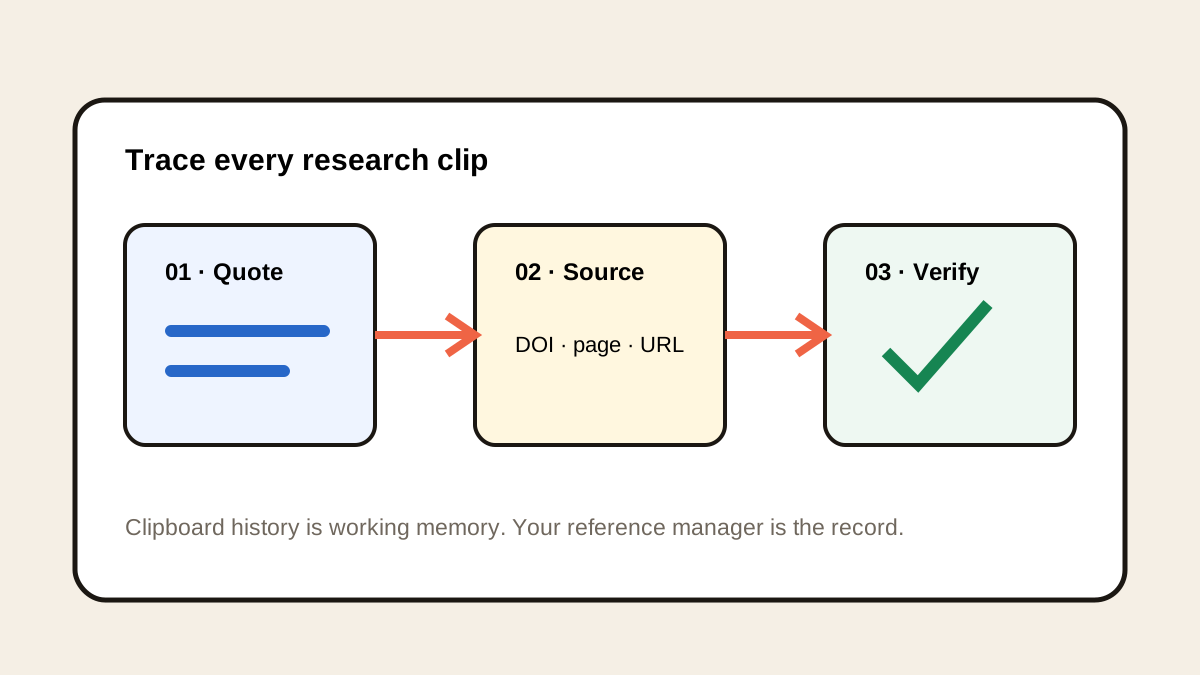
Prefer the article DOI or publisher URL, then copy a title or author phrase if useful. Note whether you are viewing a preprint or the version of record.
Retrieve the lost clip
Press Option-H and search part of the DOI, article title or author name. Preview the full string before pasting it into a browser or citation manager.
Check authoritative metadata
Compare author list, title, year and identifier with the publisher or Crossref record. Do not infer the published version from a downloaded filename.
Save to a durable library
Import the verified item into your reference manager and attach notes or the permitted PDF there. Use Historr only as a temporary retrieval path.
Common mistakes to avoid
- Citing a preprint as though it were the published article.
- Treating a copied DOI fragment as a complete citation.
- Leaving the only reference in clipboard history instead of a library.
Where should the citation live?
- Search an uncommon title phrase when the DOI is hard to recall.
- Record the version of the work alongside its identifier.
- Check imported citation fields before submission.
Compare your options
| Option | Best for | Limits |
|---|---|---|
| Historr history | Recovering a copied identifier | No bibliographic validation |
| Crossref or publisher | Checking metadata and DOI | Requires a lookup |
| Reference manager | Durable bibliography | Imported records still need review |
Historr history
Best forRecovering a copied identifier
LimitsNo bibliographic validation
Crossref or publisher
Best forChecking metadata and DOI
LimitsRequires a lookup
Reference manager
Best forDurable bibliography
LimitsImported records still need review
Put it into practice with Historr
Historr's free local search helps a researcher recover a DOI after several other copies. It works as a bridge between browsing and a proper citation manager.
It does not track scholarly versions or generate trustworthy citations by itself. Verify the record and save it in the research library.
- Instant search
- Unlimited history
- Favorites
- Keyboard shortcuts
- Privacy
- Offline storage
- Quick preview
- Paste Stack

Keep your next good idea.
Free, private clipboard history for your Mac.
Questions, answered.
Can Historr recover a DOI copied before recording started?
No. It can search only supported copies recorded while active.
Does a DOI prove I have the final article version?
Check the DOI record and publisher page; copied text alone does not settle version choice.
Can I use history as my bibliography?
No. Keep verified references in a citation manager or project library.
What metadata should I check?
At least title, authors, date and identifier, plus the version required by your citation style.
Take it from here
Clipboard search can recover the breadcrumb. A verified DOI record and maintained reference library turn it into a dependable citation.
If you're looking for a faster way to search, organize, and reuse everything you copy, try Historr and see how much time you can save.
Continue with these guides
- Gather research PDFs for a reading session
Stage papers while keeping citations in a real reference library.
- Crossref metadata guidance
Check why complete bibliographic fields matter.