How to Keep Source Links With Copied Research Notes
Quick Answer: Keep each excerpt beside its source title, URL, and location in your working notes. Clipboard history helps you retrieve copied material; you still need to record and verify where it came from.
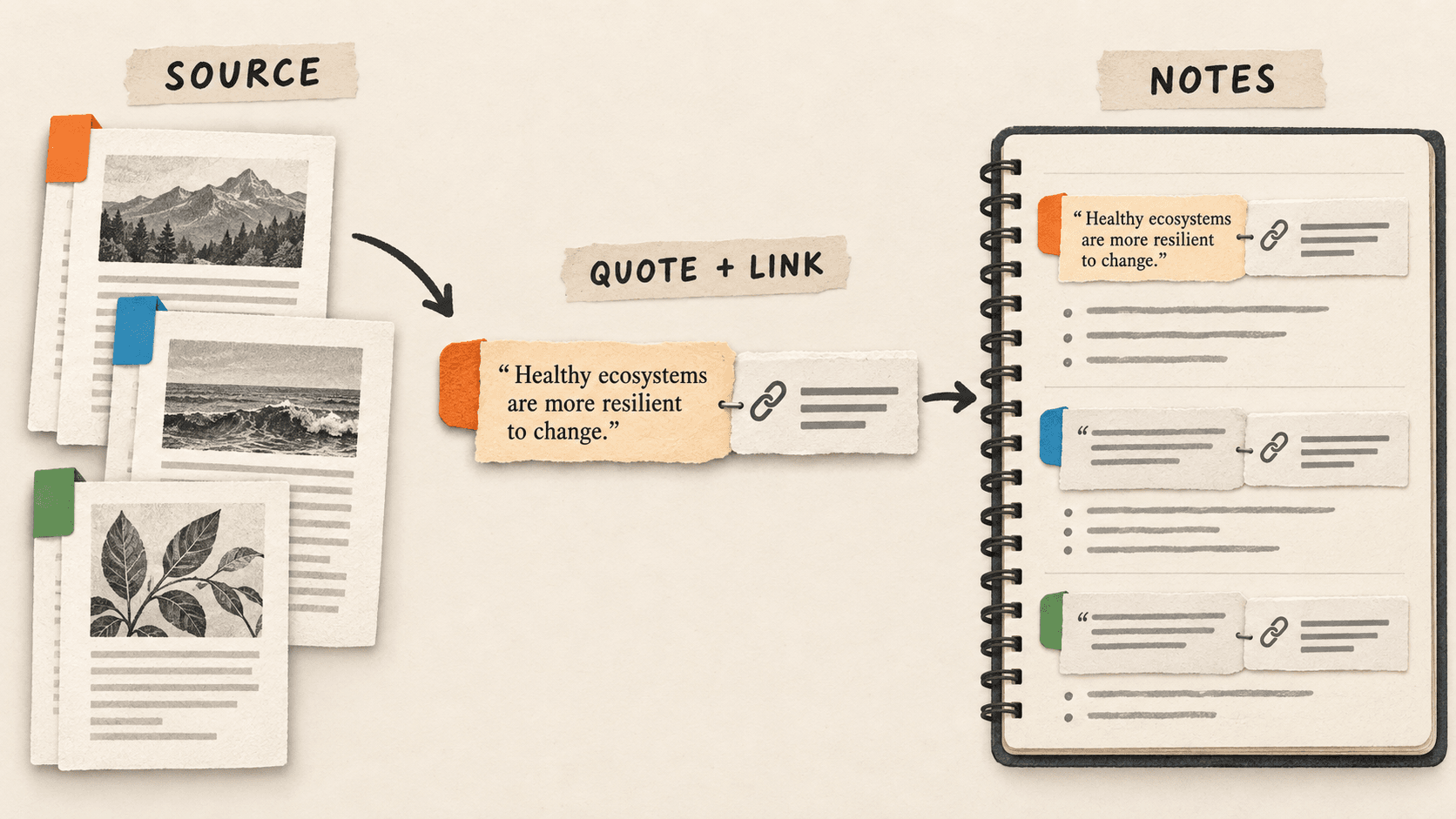
What problem does source-aware research notes solve?
You remember a useful sentence but cannot tell which of six open tabs it came from. Searching for the wording recovers the text, yet the missing source makes it difficult to quote or check.
A useful research note is a small evidence bundle: the excerpt, its source, and your reason for saving it. Keeping that bundle together makes the eventual writing session much easier.
Why do source-aware research notes issues happen?
Copying a paragraph and copying its URL are separate actions. If you collect dozens of excerpts before organizing them, the relationship between those clips becomes ambiguous.
A copied sentence also loses its surrounding context. A qualification in the next paragraph can change the meaning, so a saved excerpt should always lead you back to the original.
How can you solve it step by step?
1. Create one note per source
Start a working note with the page title and URL. For a PDF, include the page or section. Add the date you consulted it if that matters to your project. Do this before collecting excerpts.
2. Pair the excerpt with its location
Paste the exact excerpt beneath the source header and mark it as a quotation. Add a heading, page number, or other locator. For example: Source: onboarding guide; Location: Getting started; Quote: the selected sentence.
3. Write your interpretation separately
Below the quote, add a line beginning My note: and explain why the passage matters. This separates the author’s words from your interpretation when you return to the draft later.
4. Use history to recover working material
If you copied another item before pasting your excerpt, search Historr for a distinctive phrase. Preview the full text, then return to the source to confirm the wording and location. Do not infer a source merely because two clips appear close together.
5. Verify before using the note
Open the saved link, read the surrounding passage, and check that it supports your claim. Move finished references into the document or reference system you use for the project.
Which common mistakes should you avoid?
- Saving a quote without a URL or page locator.
- Treating a nearby clipboard item as proof of a quote’s origin.
- Mixing copied wording with your own summary without labels.
Which expert tips make the workflow faster?
Comparison table for source-aware research notes
| Option | Best for | Limits |
|---|---|---|
| Working note | Pairing a source with interpretation | Requires deliberate labeling |
| Clipboard history | Recovering recently copied wording | Does not establish attribution |
| Reference library | Managing final sources across a project | Needs maintained records |
How does Historr make clipboard management easier?
Historr provides local search and a full-text Quick Look preview for working clips. These help when an excerpt has been displaced by a newly copied link.
Use favorites for a reusable note skeleton. Keep the actual source links and quotations together in your notes; this workflow does not depend on Historr automatically attaching source citations.
What do people ask about source-aware research notes?
Does clipboard history automatically cite my sources?
Do not rely on it for citation. Record the source title, URL, and location yourself, and follow the citation requirements of your project.
What if I recover a quote but not its source?
Use the exact wording as a search clue, then verify it against the original. Leave it out of your published draft until you can establish its source.
Can I use this workflow for PDFs?
Yes. Record the document title and a page or section locator beside the excerpt, plus a stable link or project file reference.
What is the final verdict?
A research clip becomes useful evidence when you can trace it. Pair source and excerpt while collecting, keep your interpretation separate, and verify the original before you write.
If you're looking for a faster way to search, organize, and reuse everything you copy, try Historr and see how much time you can save.